

![[Translate to Englisch:] Studiengruppen (© Andreas Merokis / ZQS)](/typo3temp/lf_vhs_direct/fpdirect_68e36fdcf9870806d41891d75fff36c521fec3a0.webp)
![[Translate to Englisch:] Studiengruppen (© Andreas Merokis / ZQS)](/typo3temp/lf_vhs_direct/fpdirect_d48937164592216283466c6bc57adf5ba2228e75.webp)
![[Translate to Englisch:] Studiengruppen (© Andreas Merokis / ZQS)](/typo3temp/lf_vhs_direct/fpdirect_a1764edf911f4cffec6b36000f2533b9609309be.webp)
Study groups in Stud.IP are comparable to a course or seminar. They form a digital learning space that enables students to learn or work on content together and exchange ideas. Study groups differ from courses or seminars in that they can also be created by students themselves.
In a study group, for example, files, literature lists or other information can be shared with each other and messages can be sent to all members. Exchange via a forum is also possible. In the following, we will introduce you to the essential functions of study groups and give you tips on how to use them.
-
What are the functions of a study group?
A study group, like a course, can have several functions:
- File folder / tutorial
- BigBlueButton / video conferencing tool
- Blubber (chat)
- Forum / tutorial
- Wiki-Web / tutorial
- Free information page
- Learning space booking / tutorial
- Ilias-Interface / learning management system
- Flowcasts-Plugin / Einbettung von Videos in Stud.IP, tutorial
- PraktikaDB
- Appointment scheduling
- Cliqr (Single-Choice-Umfrage)
-
Where can I find the study groups?
In Stud.IP, click on the 'Veranstaltungen' icon to find the 'Meine Studiengruppen' tab, or click on the 'Community' icon to find the ‘Studiengruppen’ tab. You can also create a new study group there. You will find a quick guide further down this page.
-
Who can use study groups?
All students and employees of Leibniz University Hannover who have a Stud.IP account.
-
How do I delete a study group?
Founders of a group can select the option 'diese Studiengruppe löschen' in the study group under 'Verwaltung'.
-
Where is my data stored?
Study groups are a GDPR-compliant way to exchange sensitive information, as Stud.IP is operated on university servers. Further information:
-
How can members be removed from a study group?
Founders of a group can remove members from the study group under 'Teilnehmende' or change their status.
How study groups work
-
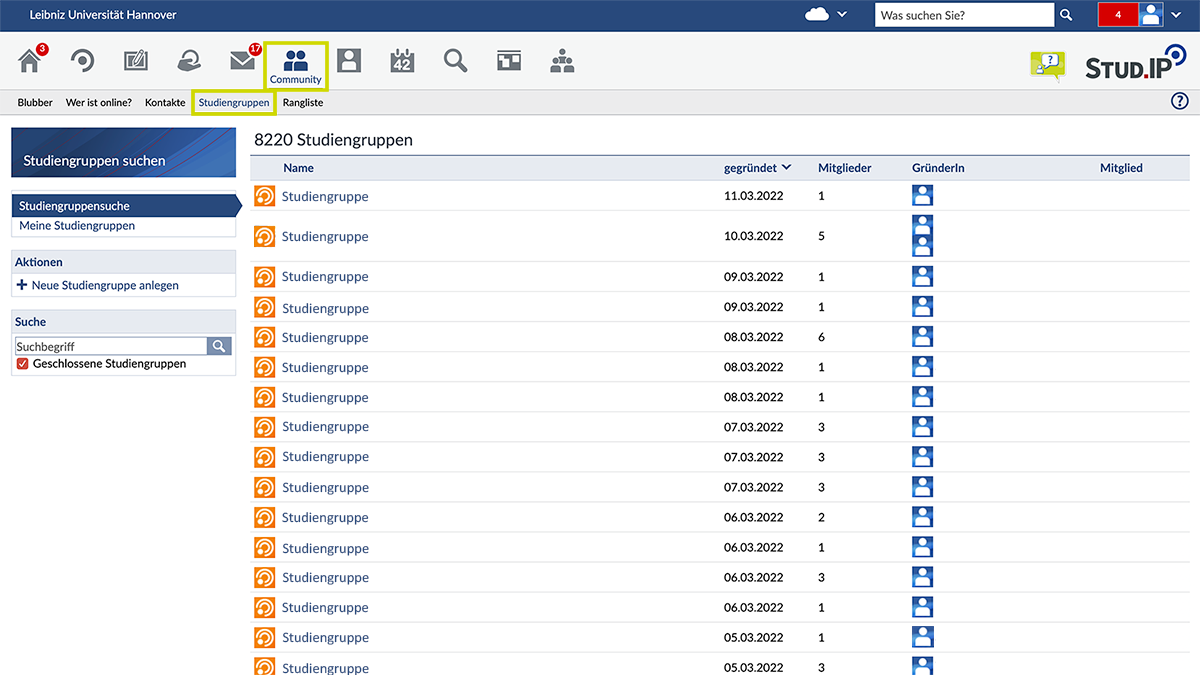
Studiengruppen finden
Über den Pfad „Community > Studiengruppen“ wird eine Liste aller Studiengruppen angezeigt. Über die Suchfunktion kann nach bestimmten Gruppen gesucht werden. (© Stud.IP/LUH)
-
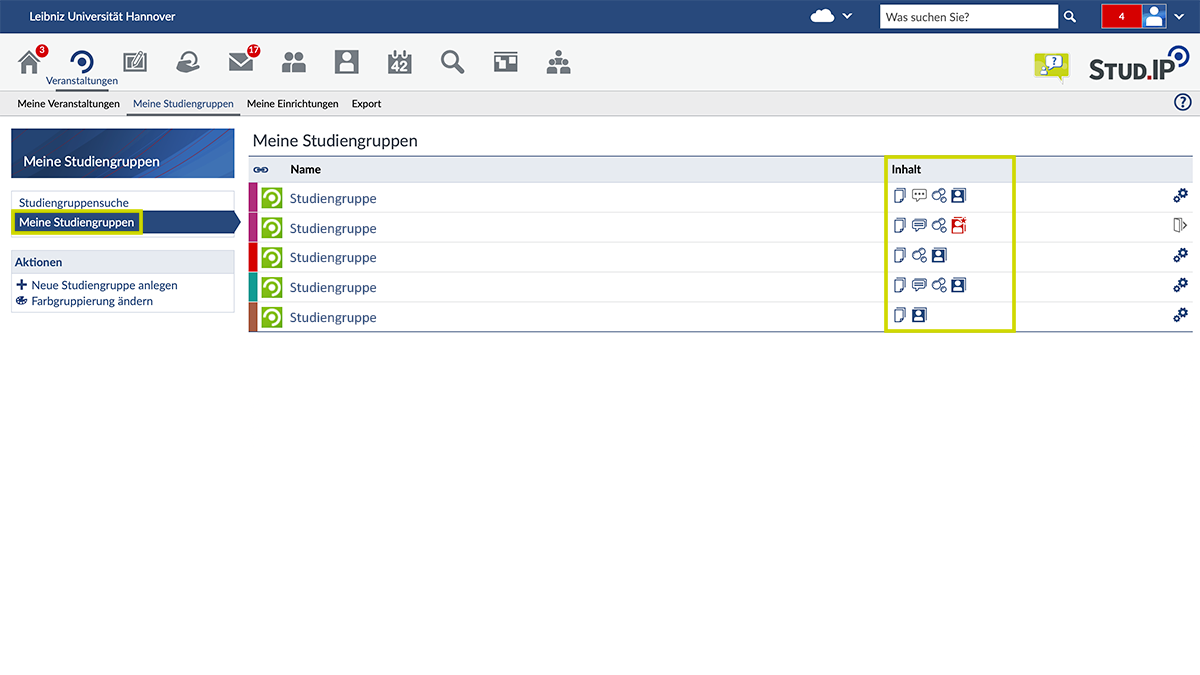
Meine Studiengruppen
Über das Icon "Meine Studiengruppen" werden die Gruppe angezeigt, in denen Sie Mitglied sind. In der Liste wird ebenfalls ersichtlich, über welche Tools die jeweiligen Gruppen verfügen. (© Stud.IP/LUH)
-
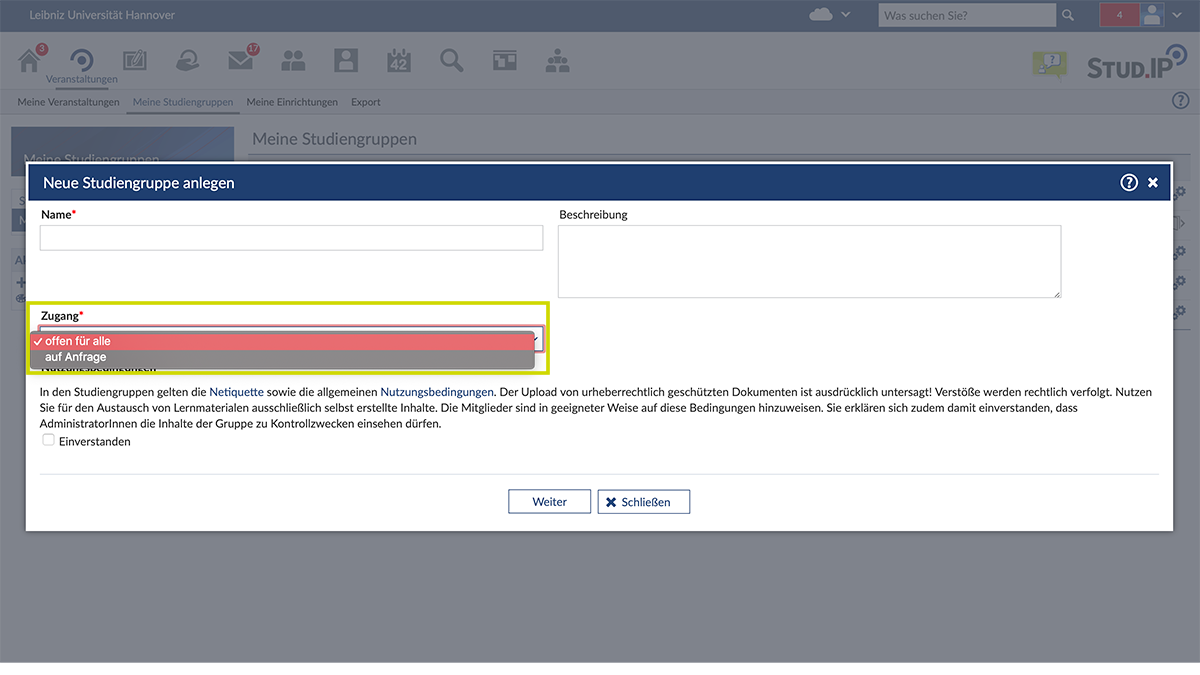
Neue Studiengruppe anlegen
Über das Icon "+ Neue Studiengruppe anlegen" kann eine solche Gruppe angelegt und entschieden werden, ob diese öffentlich oder privat ist. (© Stud.IP/LUH)
-
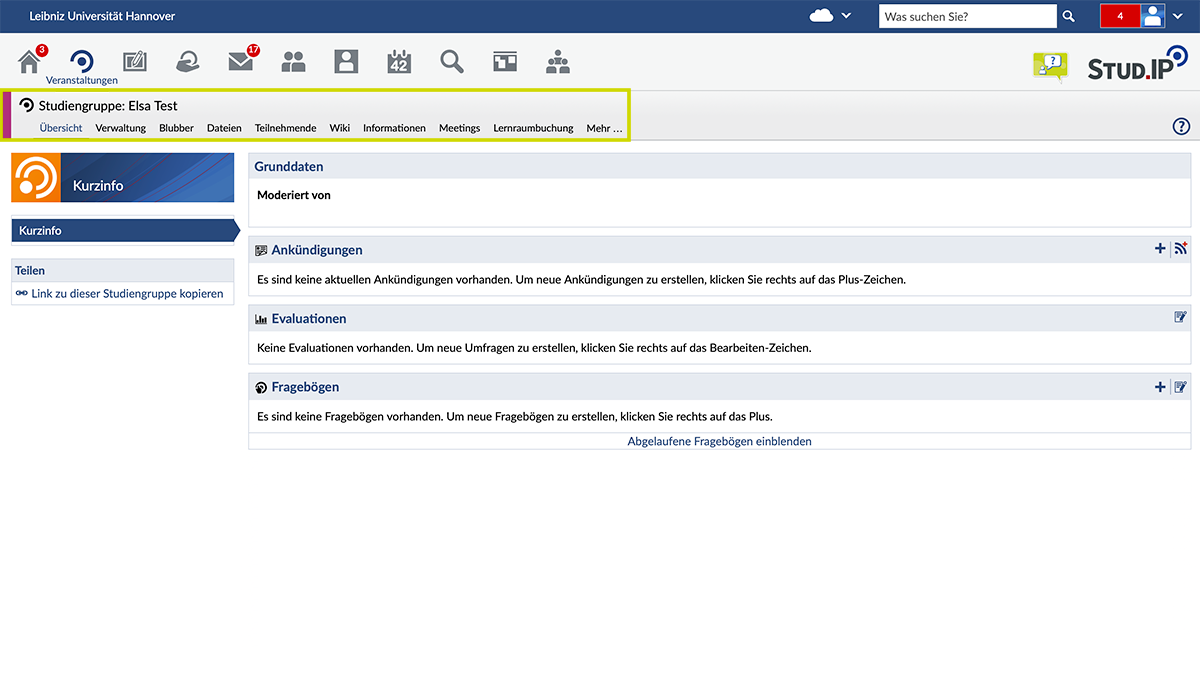
Funktionen einer Studiengruppe
Wird eine Studiengruppe ausgewählt, können die Eigenschaften angesehen und genutzt werden. Über das Icon „Mehr…“ können Sie weitere Funktionen hinzufügen oder bereits hinzugefügte Funktionen löschen. (© Stud.IP/LUH)
Contact & Support